

 How to Navigate a Data Breach
We received the dreaded letters in October. Our data was breached in February 2024. (I’ll put a link in the notes about this particular breach.)
This post will help you learn the ropes to navigate a breach. You’ll need to clean up accounts, emails, and passwords.
I’m cleaning my personal Gmail address and a favorite password, as well. These were compromised long before this event. (P.S. Don’t have a favorite password. Use unique passwords.)
I’ll make this process easy to fathom. I promise. Let’s chart your course.
What is that??
Before we set sail, here are some words and terms to know.
- Biometrics are fingerprints or face scans to prove it’s you.
- CAPTCHA (Completely Automated Public Turing test to tell Computers and Humans Apart) – You’ve seen these. You’re asked to identify the bicycles in a grid image or recognize the distorted letters and numbers of different sizes and fonts.
- Multi-factor Authentication (MFA) is a security login process requiring more than one form of identification.
- Two-step Verification is an MFA of two steps.
- One Time Password (OTP) is a code sent from a site to give you access. They might ask you to state your preference to receive your OTP through a text or an email message.
- An Authenticator app will provide a new OTP every 30 seconds. I use Google Authenticator, but there are more than 20 to choose from. PC Magazine recommends five of The Best Authenticator Apps for 2024.
- Password Manager is an app to securely stow your passwords and other sensitive information. We use SplashId for $30 per year. Ask your friends for other recommendations.
- Phishing (not fishing) occurs when a hacker sends a message pretending to be reputable. He wants to trick you into revealing your password or other information.
In a Perfect World …
Many websites put security in place with MFAs, CAPTCHAs, biometrics, or other means.
You’re ready to sign up. Here’s help for strong passwords:
- Avoid personal information.
- Create unique passwords for every site (I know, I said that already).
- Avoid short, common words.
- Use random passwords. This Password Generator can help.
- Make the passwords at least 12 – 14 characters long.
- Have a mix of upper and lower case letters, numbers, and special characters (these may be required by the site).
- Don’t reuse old passwords.
- Update your passwords from time to time.
When a site asks you for a password, they should tell you what’s required to make it secure for their site. (One site kept me guessing what they didn’t like about my special characters.)
Use a password manager to keep track of all these unique logins. (Google Chrome has a built-in password manager. I’m not comfortable storing more of my information on Google.)
The websites you visit have done their part. You’ve created secure passwords.
And then the Breach
Someone somewhere has your email, your password, and even personal and financial data. You’ve been hit broadside. (Oops. Did you click on that phishing email about your password?)
You might find out about a breach through Google Chrome. If your password is compromised, Chrome will alert you to update your password the next time you log in.
The people behind your favorite website may also warn you or upgrade their sign-in process with greater security.
You have to take the time to change your password or sign up for MFAs. Don’t put off making these recommended changes.
If, like me, you receive a notice of a serious breach, set aside time almost every day to bail out of this problem. If you can move on this even faster, that’s better.
No Standards
I don’t want you to feel out of your depth. I hope the following helps you navigate a breach. Here’s what I’ve encountered.
There are no standards for deleting an account. For each site, decide how to approach a site administrator about your problem.
I’ll list what I’ve tried so far from easiest to hardest. I’m including the questions I ask myself during the process.
Unsubscribe from an email list.
If the site is a “small fish” in the huge Internet ocean, I might be safe with just unsubscribing from a list.
Am I still on their database after I unsubscribe from a mailing list?
Change your email address to sign in.
Most sites have a place on your account page to change email addresses.
Do you have another email provider that you use? I have an address with Yahoo that I check four times a year. When I don’t need to check email often for a site, this is a good harbor to anchor those messages.
Since my Gmail address is compromised, I’m switching some of my logins to Yahoo. I will need to visit my Yahoo inbox more often after I do this.
Change the password.
The easiest and quickest way to change a password is to click on the “forgot my password” link. Follow the prompts to change your password.
I have so many accounts to deal with, I usually take this step and don’t even log in.
If you log in, most sites have a place on your account page to change passwords.
I don’t want to use the “ABC service” anymore. I have so many sites to update, that I’ll change the password for now. I wrote in our password manager that I want to try to delete the ABC account later.
Enable MFA.
When offered, turn on MFA.
Deleting an account.
If I stopped using an account or if a site doesn’t have much protection, I want to delete the account.
This has been the hardest to do. I have not seen a delete option on a website yet.

Here’s the form I had to fill out for one group. I should have written: “Do you have my email and password in your database? They have been compromised and I would like my account deleted.”
I signed up for a weekly email years ago with the Gmail address and “favorite password.” I learned they stopped the mailing some time ago, but they kept my address and password. The admin agreed to delete these.
Sometimes, it seemed like the company felt like my email was their personal property. One big business agreed to deactivate my account, but I had to jump through hoops to delete it. I received this email:
“Thank you for your inquiry regarding the deletion of your personal data. To submit your request through our secure online portal please click here. After clicking “submit,” you will need to follow instructions to verify your email address. Upon verification of your email, our Data Privacy Team will respond to your request and send you a message through our secure online portal once the request has been completed.”
I filled out a form. They sent me a verification email.
I’m not sure I will ever know if they deleted my email since they say they will tell me “through their portal.”
Unanswered questions.
I have a “frequent eater” account with a restaurant. I used my compromised Gmail address to sign up. They don’t have a login to their website. I’ll wait until they send an email and find out who I contact to change to the Yahoo email.
What about Passkeys?
Passkeys launched about a year ago. You’ve been offered the chance to create a passkey by now.
This video, Understand passkey in 4 minutes, has a good overview.
I considered setting up a Passkey. It sounded less complicated than knowing all my passwords.
I have too many questions, however. I don’t want my main key on my phone. What if the phone is ever lost, stolen, or replaced?
I would put the main key on my desktop, but to do that I need to create a PIN for it. Will that create more steps to log in to my computer at home?
I decided to take a pass on passkeys for now. I’ll keep it on my radar.
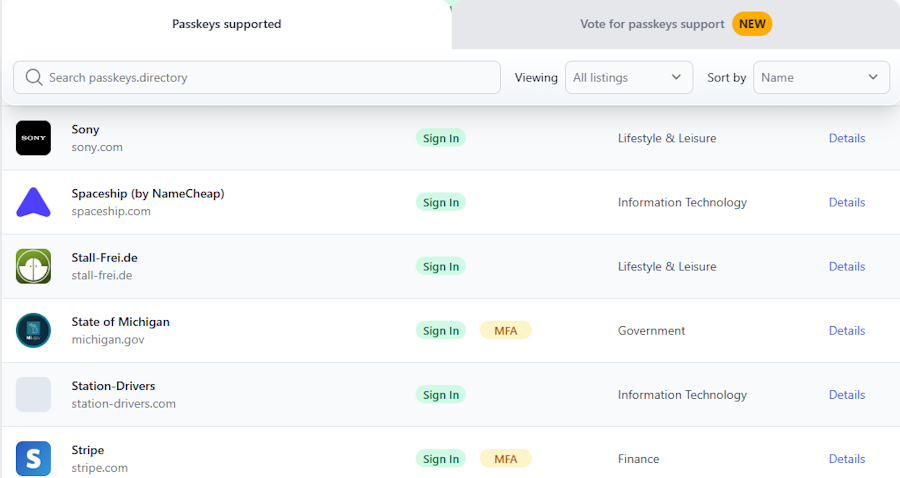
If you want to try passkeys, this Passkeys.Directory lists websites and apps that use them. Here’s a screenshot:
It was a long voyage, but a necessary one. Now that you’ve updated or deleted your accounts, you’re shipshape again.
Did you receive the “dreaded letter?” Write me and let me know how it’s going.
NOTES:
- Change Healthcare manages 15 billion transactions annually related to insurance claims and billing. They were breached by ransomware on February 21, 2024.
- Eight months later, we know that almost one-third of Americans are affected. Change Healthcare mailed at least 100 million letters to individuals. In the letter, they offered a free two-year security service. Read more from HIPAA at “Change Healthcare Cyberattack affected 100 Million Individuals.”
- If you received the letter, sign up for the free two-year service from IDX.
- You might also want to read How To Tell If You’ve Been Hacked: 12 Warning Signs (Aura.com)
- Open lock photo by Anna Might on Unsplash.
Pin me, please

 eQuipping for eMinistry